
YOUR CLIENTS ARE YOUR MOST CREDIBLE VOICE.
Here's How to Let Them Speak for Your Practice — On Camera.
A Video Testimonial Guide for Doctors, Lawyers, Health Spas, and Rehab Clinics
Someone walks out of your office — or your clinic, or your spa — feeling genuinely better. Their problem has been addressed. Their question has been answered. Their life has measurably improved because of what you do.
Now here’s the question: does anyone else know that?
In professional services, reputation is everything. People don’t randomly pick a doctor, a lawyer, or a rehab clinic. They research. They ask friends. They read reviews. They look for proof that you are trustworthy, capable, and caring. A video testimonial — a real person, in their own words, describing how you helped them — is the most powerful form of that proof that exists.
One 60-second video of a patient, client, or guest speaking honestly about their experience with your practice will do more to build your reputation than a full page of website copy ever could. Because it’s not you saying you’re great. It’s someone else saying it. And that makes all the difference.
Why Video Testimonials Matter for Professional Service Firms
For professional services — medical practices, law firms, mental health providers, wellness spas, rehabilitation centers — the decision to choose a provider is deeply personal. People are often scared. They may feel vulnerable. They are trusting you with their health, their finances, or their future.
Video testimonials address that fear directly. Here’s why they work so well:
- They reduce fear. Watching a real patient or client describe a positive experience makes a nervous prospect feel safe enough to call.
- They establish credibility. Anyone can say they’re excellent. A satisfied client saying it is proof.
- They humanize your practice. People connect with people — not with credentials, logos, or ad copy.
- They work around privacy concerns. Many of your clients can’t or won’t leave written reviews. But many will happily talk on camera if asked the right way.
- They differentiate you. Very few professional service providers have video testimonials. Having them immediately sets you apart.
A Note on Privacy and Consent
Before filming any testimonial, always get written consent from the person being recorded. For medical practices and rehab centers, this is especially important. Your consent form should clearly state that the video may be used for marketing purposes on your website, social media, and advertising. Keep signed copies on file. Your marketing team can provide a template if needed.
Important
For medical and mental health providers: Do not ask patients to disclose clinical details on camera. Focus questions on their overall experience, how they felt before and after, and what they would tell someone in a similar situation — not diagnoses, treatments, or specific health information.
Where to Use These Videos
A single well-made testimonial video can be repurposed across many platforms:
- Your website homepage — where first impressions are made and trust is established
- Individual service pages — a testimonial specific to that service (e.g., a client discussing your family law services on your family law page)
- Google Business Profile — video posts increase engagement and visibility in local search
- LinkedIn — especially powerful for law firms, financial advisors, and consultants
- Facebook and Instagram — shorter clips work well as Reels and Stories
- YouTube — people actively search for reviews of doctors, spas, and clinics on YouTube
- In new patient or client welcome packets — video links can be included in onboarding emails
- In paid digital advertising — video ads significantly outperform static image ads
How to Film the Video: Simple Steps Anyone Can Follow
You do not need professional video equipment. A modern smartphone produces more than enough quality. The most important things are your setup, your framing, and the questions you ask.
Step 1: Prepare Your Questions in Advance
Choose two or three questions ahead of time. For professional services, the best questions focus on the experience and the outcome — not clinical or legal specifics. Here are examples tailored to your industry:
Medical Practice
What made you choose our practice, and how would you describe the care you received?
Law Firm
Without getting into details of your case, what was it like working with our team during what was a stressful time?
Health Spa
How did you feel when you arrived, and how did you feel when you left? What stood out to you?
Rehab Clinic
What would you tell someone who was considering this program but wasn't sure if they were ready?
Mental Health
What changed for you after starting your work with us? How is your daily life different?
Any Practice
What would you tell a close friend or family member who was looking for a provider like us?
Step 2: Set Up Your Phone Correctly
This takes less than two minutes and makes the difference between a polished video and a shaky, amateur one.
Do This
Don't Do This
- Turn phone SIDEWAYS — landscape (horizontal)
- Set camera to 4K at 24fps in your camera settings
- Customer looks at YOU — not the camera lens
- Use a small light stand + phone holder (can sit on a desk)
- Film in a clean, quiet space with good natural or office lighting
- Hold phone upright — portrait (vertical)
- Leave camera on auto/default settings
- Customer stares directly into the phone
- Hold the phone yourself (wobbly footage)
- Film in a hallway, waiting room, or loud environment
Settings
Open Camera app → Settings/gear icon → Video → select 4K at 24fps. If not available, choose the highest resolution listed.
Step 3: Frame the Shot — Where to Stand
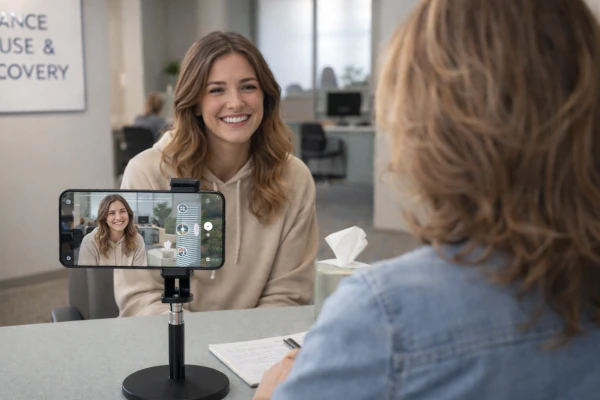
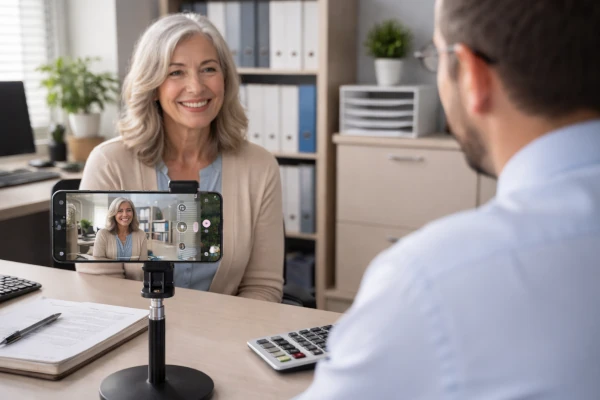
Do not place the person being filmed in the center of the frame. Divide the screen mentally into three vertical sections. Place your client or patient on one side (say, the left). Stand on the opposite side (the right). The camera goes in the middle, aimed at the client. This is called the rule of thirds, and it makes any video look more intentional and professional.
For professional service settings: the background should be clean and reflect your brand. A tidy office, a reception area with your logo visible, or a neutral wall are all excellent choices.
Customer on one side. You on the opposite side. Completed project visible in the background.
Step 4: Your Equipment — Simple and Inexpensive
You have two options for holding the phone. You can hand-hold it while you stand and ask questions — that works fine, but could be a little shaky. Or, for a steadier, more polished look, pick up a small stand and a phone holder clip. The whole setup costs under $30 and fits perfectly on a desk.
Sound Tip
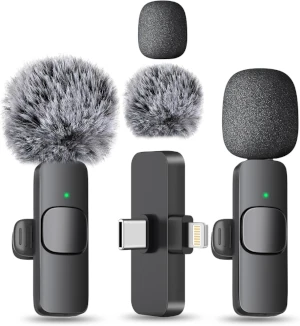
For under $20, a small Bluetooth wireless clip microphone connects to your phone and dramatically improves audio quality, especially in larger rooms. For a professional practice setting, crisp audio is essential to your brand image.
Conducting the Interview
This is where many professionals get nervous. They overthink it. Here is the only rule that matters:
Ask the question. Then stop talking. Let them answer completely.
Professional service providers are trained to talk — to explain, to guide, to reassure. In an interview setting, that instinct works against you. Your client’s unscripted, honest words are the most powerful content you can have. The moment you interrupt or redirect, you lose it.
Additional guidance:
- Keep the environment calm. A quiet office or private room is ideal — no phones ringing, no other people walking through.
- If the subject seems nervous, reassure them: ‘Just talk to me like we’re having a normal conversation. We can always start over.’
- If they want to stop: always honor that immediately, no questions asked.
- Let silence work for you — after they finish answering, wait two beats before asking the next question. They often continue.
- End every interview by asking: ‘Is there anything else you’d like to add or anything you want others in your situation to know?’
After the Shoot: Sending It to Your Marketing Team
You’ve got the footage. Now don’t just let it sit on your phone! If you’re working with our marketing team, just send us the raw file. We’ll handle the edit it, put in background music, your branding, and post it to all your social media channels. If you’re doing this on your own, you can find simple online video editing tools like CapCut to handle the editing, then post it to all your channels.


